
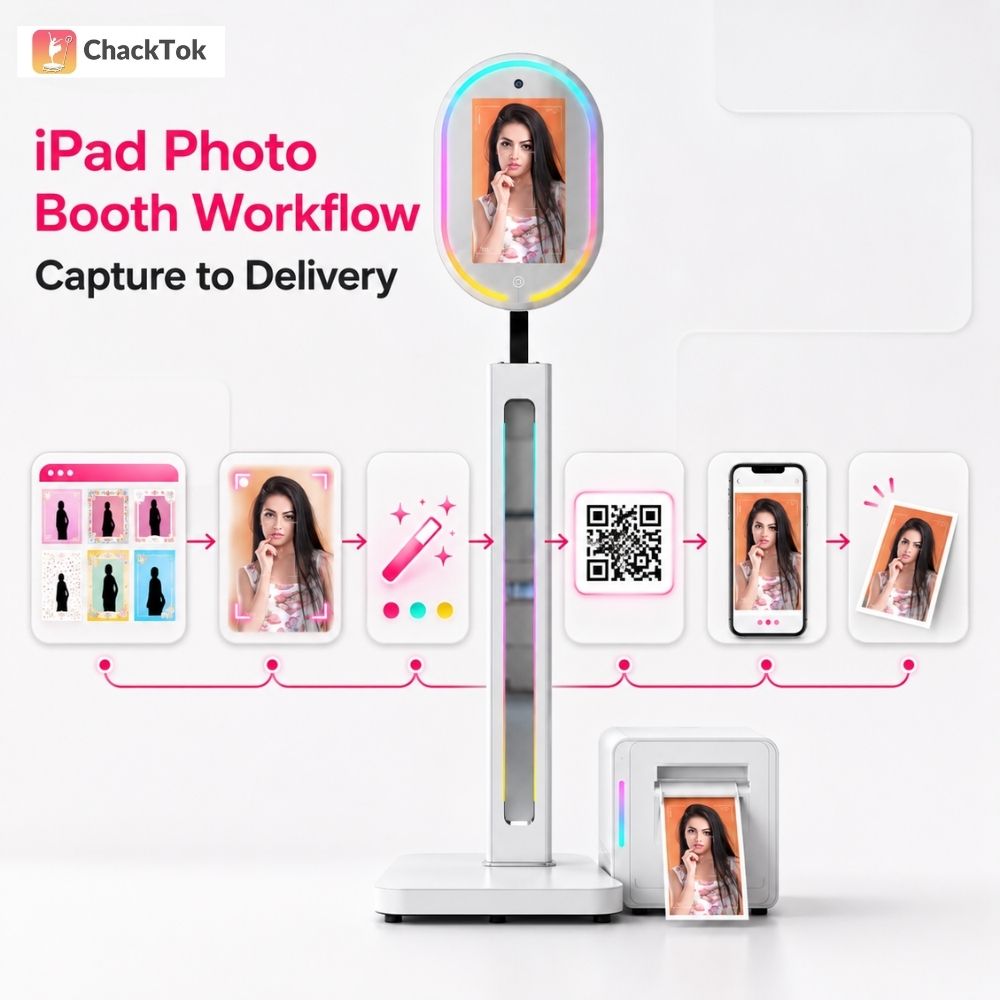
An iPad Photo Booth workflow covers more than taking a picture. Operators must prepare the event, guide the guest, manage the capture, apply the visual design and deliver the finished content.
ChackTok brings those steps into one mobile software workflow while supporting different camera, display, printer and booth configurations.
Short answer: ChackTok is a professional Photo Booth software platform that runs the full iPad booth workflow — event setup, capture, AI image processing, printing and digital delivery. It works with built-in iPad cameras, DSLR cameras and mainstream action cameras such as GoPro and DJI. The platform has more than 390,000 registered users, over 65,000 connected Photo Booth devices and has supported more than 780,000 commercial events, based on ChackTok system backend and event records.
What should an iPad Photo Booth workflow cover?
A useful workflow begins before the first guest arrives.
Operators need to choose the capture mode, prepare branded templates, set the sharing options and test any connected camera, display or printer.
During the event, the iPad becomes the control point for the guest session. After capture, the same workflow handles preview, retakes and delivery.
ChackTok supports photos, videos, GIFs, boomerangs, spin videos and slow-motion content. Operators can use existing templates or add frames, stickers, filters, music and branded graphics.
On the processing side, the app handles real-time AI background removal and replacement (AI Cutout), intelligent slow-motion smoothing, high-frame-rate composition, beauty filters and dynamic sticker effects. Most client-requested looks are therefore produced on site rather than in post-production.
One-click event templates cover formats such as weddings, birthdays and brand launches, and support hidden watermarks, custom disclaimers and batch content management.
Can operators choose different camera setups?
Yes. The workflow can use the built-in iPad camera or an external camera.
ChackTok supports iOS and Android devices, DSLR cameras and mainstream action cameras including GoPro and DJI. This lets an operator choose a compact self-service setup or a higher-specification camera package.
Operators who already own booths from other manufacturers are not locked out. Through its built-in wireless control architecture, ChackTok supports and controls hardware from more than 12 major global Photo Booth brands.
The app can also extend content to a TV or projector. This is useful when the client wants the booth session or finished media to become part of the wider venue experience.
DSLR capture, action camera capture and external TV or projector output are validated on MWE iPad Photo Booth configurations. Operators should still run one full dry test with their own camera model, connection method and venue network before a live booking, because cables, firmware versions and site Wi-Fi differ from event to event.
How do the software and booth hardware work together?
ChackTok is the professional software platform that runs event setup, hardware interaction, image processing and content delivery.
MWE (Make Win Easy) is the hardware collaboration brand for compatible iPad Photo Booth equipment. This includes portable booth structures, lighting and selected display configurations.
The current LCD iPad Photo Booth configuration ships with a 1080P display and a 21-inch RGB ring light. The Crystal and portable formats use different enclosure styles for operators whose priority is transport and setup speed rather than an on-site advertising surface.
Operators can compare the available formats in the iPad Photo Booth collection.
Before choosing hardware, confirm the iPad model, mounting dimensions, lighting needs, transport plan and whether the event requires an external display or printer. Getting these five points wrong is the most common cause of on-site improvisation.
How is guest content delivered?
Capture is only half of the service. Guests also need a clear way to receive the result.
ChackTok supports delivery through QR codes, email, SMS and direct sharing to major social platforms including Instagram, TikTok and Facebook, with 1GB of free cloud storage included. It also supports printer connections for events that require a physical takeaway.
Venue Wi-Fi is usually the weak point, not the software. Offline task queuing lets the app hold uploads and release them once connectivity returns, so guest content is not lost when a network drops mid-event.
The operator can select the delivery methods during event setup instead of making the decision during each guest session.
This reduces manual handling and keeps the experience consistent from the welcome screen to the final file or print.
What can an operator report back to the client?
Corporate and brand bookings are judged on marketing outcome, not photo count.
ChackTok includes basic data collection: end-user email capture, social sharing counts and event engagement analysis. Operators can use these figures to show a client what the activation produced, as long as the guest-facing disclaimer and consent wording are configured before the event and follow local data rules.
Which setup fits which event?
Different bookings need different operating choices.
| Booking type | Capture setup | Delivery | Main risk to control |
|---|---|---|---|
| Drop-off rental | Portable booth, built-in iPad camera | QR code and digital sharing only | Guest flow must work with no attendant on site |
| Wedding | LCD or Crystal booth with ring light, branded templates | Digital sharing plus on-site prints | Print consumables and venue lighting |
| Corporate activation | Custom graphics, external display, DSLR or action camera option | Digital sharing with email capture and reporting | Consent wording and client brand approval |
| High-volume event | Fastest capture mode, minimal template steps | QR code first, offline queue enabled | Queue management and network bandwidth |
The right setup is the one that matches the venue, guest volume and promised deliverable.
More hardware does not automatically create a better event.
An operator checklist before launch
Before accepting a booking, confirm:
- The iPad and camera configuration has been tested.
- The booth mount fits the selected iPad model.
- Lighting is appropriate for the venue.
- The sharing method works on the venue network.
- The printer and paper workflow have been tested, if printing is included.
- The event template and client branding have been approved.
- A fallback delivery method is available if connectivity changes.
- Guest data capture, disclaimer and consent wording are configured if the client expects post-event reporting.
This checklist turns the software and hardware into a repeatable service rather than a one-off setup.
Next step for operators
Start with one test event rather than a full fleet decision.
- Read the ChackTok setup guide for device connection, event setup and content sharing.
- Run the pre-launch checklist above on a single booth, including one print and one digital delivery.
- Compare the available booth formats in the iPad Photo Booth collection against the booking types in the table above.
- Contact ChackTok with your iPad model, camera and event type to confirm the compatible configuration before committing to hardware.
About ChackTok
ChackTok is a professional software system brand for global event imaging and interactive device applications.
It focuses on system control, event workflow management and content output for Photo Booths, 3D scanning systems, robotic camera arms and related interactive imaging equipment.