
ChackTok Photo Booth Guide
Sky Overhead 360 Photo Booth for Big Parties: A Practical Operator’s Guide
More room for the group. A different way to plan the shot.
A small 360 platform can make a striking video of two or three people. Then the wedding party arrives together. Or an entire team wants to join the company celebration. Splitting everyone into separate clips changes the moment.
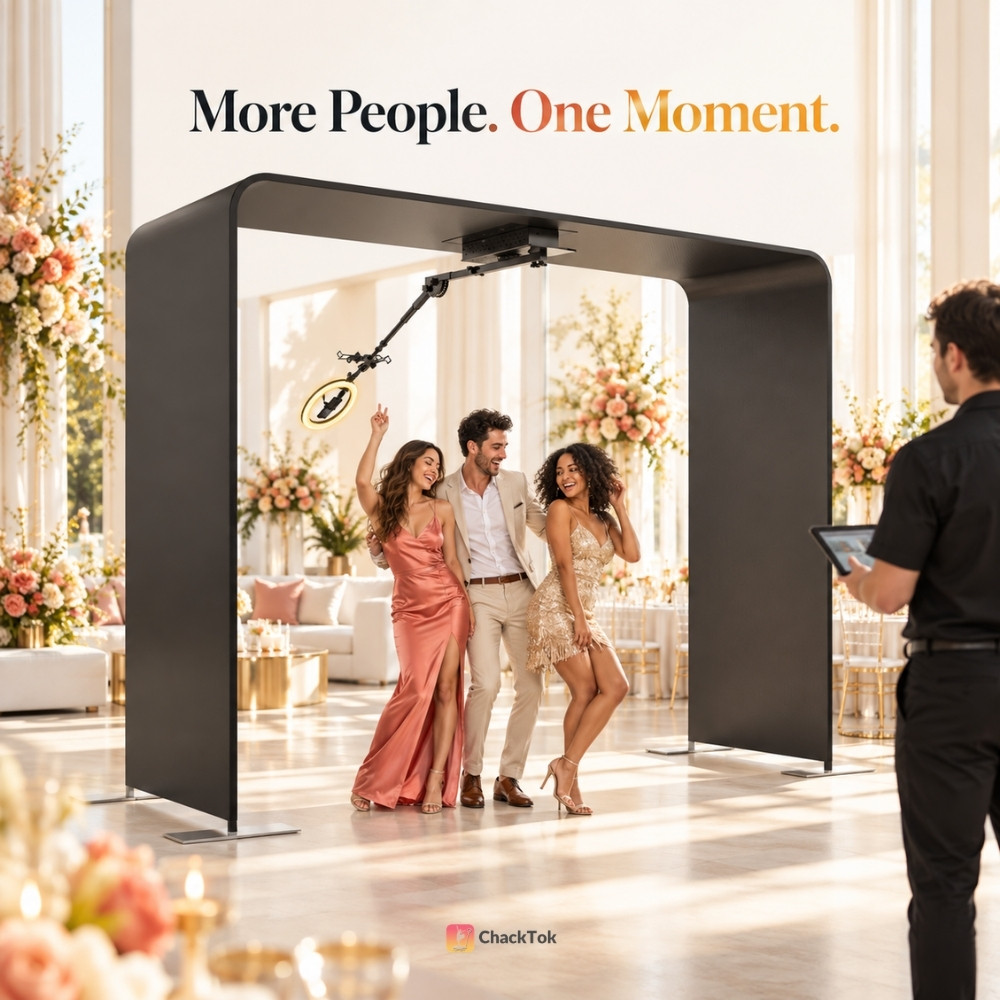
A Sky 360 photo booth takes a different approach. Guests stand on the floor while a camera and light rotate from an overhead structure. The format gives an operator room to film a larger group together, with a full-body view and the motion people expect from a 360 booth experience.
That larger frame creates opportunities for parties, weddings, and brand events. It also asks more of the operator. The structure needs suitable space, the moving arm needs a clear path, and the software needs to turn a good capture into content guests can receive. Here is how to plan the whole experience.
What Is a Sky Overhead 360 Photo Booth?
In a conventional 360 booth, guests usually stand on a raised platform while a camera arm moves around its edge. In a Sky or overhead setup, guests remain on the floor beneath a frame, and the camera assembly moves above them.
The word “360” describes the camera’s movement around the group. The finished result is usually a short moving photo or video, often with slow motion, music, or an event design. It does not automatically mean an interactive panoramic or VR file.
| Planning question | Overhead Sky format | Typical platform format |
|---|---|---|
| Where do guests stand? | On the floor within a defined capture area | On a raised circular platform |
| What is the main advantage? | More room for group compositions | A compact capture area for smaller groups |
| What needs extra attention? | Frame assembly, overhead clearance, arm movement, and guest boundaries | Platform access, platform capacity, and the arm’s surrounding clearance |
Neither format is right for every booking. The useful question is whether the group size, venue, and content brief match the structure you plan to bring.
What the Listed Sky Package Offers
The Sky configuration described for this product is designed for large-group capture. The supplied product description states a 120 × 84 in size and an intended group of approximately 7–15 people. A collaborating MWE hardware listing publishes the same figures. Treat the group range as a planning guide, not a promise that every group of 15 will fit comfortably in every camera frame.
Actual framing depends on the camera or phone, lens choice, arm position, guest height, and how the group stands. A formal group pose and an energetic dance clip may need very different amounts of space.
The listed hardware also includes a ring light with three color-temperature modes and ten brightness settings per mode. The light can help with changing indoor conditions, but the operator should still test faces across the entire group. Lighting that looks good on the center guest may leave people at the edges too dark.
Phone, GoPro, tablet, and camera mounting options are described for the collaborating hardware configuration. Check the holder and software workflow for the exact capture device you intend to use. Packages, mounts, tent options, and software access can vary by offer.
Before quoting a venue: confirm the assembled height, full moving-arm clearance, setup area, power needs, and load-in route for the exact package. A listed product dimension is not the same as the total working space needed for guests, staff, and a queue.
Where an Overhead 360 Experience Makes Sense
The strongest use cases have something in common: the group itself is part of the story.
| Event | Good group moment | Operator’s priority |
|---|---|---|
| Wedding | Wedding party, family, or a group of friends together | Plan the key group shots before the reception becomes busy. |
| Corporate party | A department, project team, or awards group | Use an approved brand design and a simple way for colleagues to receive content. |
| Brand activation | Visitors taking part in a campaign moment | Make the guest instructions, branding, sharing method, and any consent wording clear. |
| School or community event | Friends or teammates celebrating together | Guide each group through the area and keep the queue separate from the moving equipment. |
A floor-level guest area can also remove the step up onto a small platform. Still, do not assume that this makes every installation accessible. Check the entrance, surface, cables, and the needs of the people attending the event.
What ChackTok Software Adds to the Experience
The overhead frame creates the camera move. Software helps the operator shape what guests see and receive afterward.
With a compatible hardware and capture setup, ChackTok can support motor controls such as rotation direction, speed, and operating time. A physical button or handheld remote may also be available on the selected hardware. Confirm the control methods supplied with your package, then test each one before guests arrive.
The content workflow can include photo, normal video, slow-motion video, Boomerang, or GIF formats, depending on the selected capture setup and software configuration. Operators can prepare event templates, music, frames, stickers, and other creative elements for the brief.
For a corporate event, that could mean a restrained branded frame and a short video suitable for team sharing. For a birthday party, it might mean a brighter design, music, and a quick group prompt. The effect should serve the event. Adding every available effect usually makes the result harder to watch.
ChackTok also supports sharing workflows such as QR Code, SMS, or email. Social posting happens through the guest’s chosen channel and the available device workflow. Test the exact path you plan to offer; do not assume that a successful capture means every sharing method is ready.
Network reminder: an offline task queue can hold work that could not be completed while the connection was unavailable. A queued share is still pending. Assign someone to check and complete those tasks after connectivity returns.
Design the Group Shot Before You Design the Effects
Large-group capture looks effortless when the operator has given the guests one clear instruction. Without that direction, people drift toward the edges, block one another, or look away just as the camera passes.
Try this simple sequence:
- Choose the group size for the frame. Make a test capture with the actual camera and lens. Use the largest group that still looks comfortable in the finished video.
- Mark the standing area. Guests should know where to enter, pose, and leave. Keep the equipment’s movement area clear.
- Give one short prompt. “Look up, stay together, then celebrate as the camera comes around” is easier to follow than several pose instructions at once.
- Check the edges. Tall guests, wide gestures, props, and raised arms can change the safe clearance and the crop.
- Review one real clip. Watch the finished result on a phone, not only the live camera preview.
If the group feels crowded, split it into two intentional shots. “Up to 15 people” is useful product guidance; the right number for a particular event is the number you can film well and manage safely.
A Practical Sky 360 Setup Workflow
An overhead booth needs more preparation than placing a camera on a stand. Give the team enough venue access for assembly, inspection, content testing, and guest-flow planning.
- Confirm the site. Check the floor, ceiling, power source, loading access, nearby fixtures, and space for a waiting line.
- Assemble the frame. Follow the instructions for the exact hardware package. Check every connection and mount before fitting the capture device.
- Set the movement boundary. Keep guests, staff, props, and loose objects out of the arm’s travel path.
- Fit the camera and ring light. Secure the holder, choose the lighting mode, and test faces at the center and edges of the group area.
- Connect the controls. Test app pairing and any supplied button or remote. Confirm the direction, speed, duration, and stopping procedure.
- Load the approved event design. Check the event name, date, music, logo, frame, and any disclaimer.
- Run the complete guest journey. Capture, process, save, preview, and test each planned sharing route.
- Brief the attendant. Agree on the guest prompt, group limit, queue position, and who to contact if the setup or content needs to change.
Keep an attendant with a moving booth during operation. The team should know how to stop it promptly and should not restart a session after a safety concern until the cause has been checked.
Outdoor use needs an additional venue and weather plan. Wind, rain, heat, uneven ground, and exposed power can change whether the setup is suitable. Follow the hardware manufacturer’s limits for the exact unit; a tent alone does not establish that a setup is safe in poor weather.
Before You Buy or Quote a Sky Package
The product photo is only one part of a buying decision. Ask for answers that help you price and deliver real events:
- Which frame, arm, tent, light, holders, case, controls, and software access are included in this package?
- What are the assembled dimensions, packed dimensions, and required operating clearance?
- Which phone, tablet, GoPro, or camera models work with the supplied mount and intended software workflow?
- What power supply does the unit require, and are any battery accessories included or optional?
- How do operators stop the arm, and what should they do if movement is obstructed?
- Which spare parts and replacement controls are available?
- What venue conditions or weather conditions rule out operation?
- Which sharing methods will work at the venue, and who checks pending tasks afterward?
For rental businesses, add one commercial question: can your team deliver this package repeatedly at a price that covers staffing, transport, setup, software, maintenance, and the owner’s time?
A useful estimate starts with booking price minus the direct cost of delivering that event. Then account for fixed costs and the events you can realistically book. Hardware purchase price alone does not tell you whether a rental offer is profitable.
Make the Big Moment Feel Easy
The appeal of a Sky overhead 360 booth is easy to understand: more people can take part in the same moving shot while standing together on the floor. The professional result comes from the choices around that shot: suitable venue space, secure assembly, good lighting, a clear guest prompt, an approved content design, and a tested delivery path.
ChackTok can support the control, creative, and sharing parts of that workflow with compatible equipment. The operator brings those parts together for the event.
Explore the Sky overhead 360 photo booth packages, and use the ChackTok setup and event guide to plan a full test before your first booking.
Frequently Asked Questions
How does a Sky 360 photo booth work?
Guests stand on the floor beneath an overhead structure while a mounted camera moves around the group. The capture device and software then create a photo or short video using the selected event settings.
Can a Sky overhead 360 photo booth fit 15 people?
The described Sky configuration is advertised for approximately 7–15 people. The number that films well at a specific event depends on framing, guest positions, the camera, and safe operating space. Test the planned group size before the event.
What is the difference between a Sky booth and a platform 360 booth?
A Sky booth films from an overhead moving arm while guests stand on the floor. A typical platform booth places guests on a raised platform and moves the camera around its edge. The two formats have different space, access, and group-planning needs.
Can ChackTok control the Sky booth and share videos?
With supported hardware and the right configuration, ChackTok can control settings such as direction, speed, and duration. It can also support content and sharing workflows. Available controls and delivery methods depend on the selected hardware, device, software setup, and network conditions.
What should an operator check before a Sky 360 event?
Check the venue clearance and power, frame and camera mounts, arm movement area, lighting, controls, event design, test capture, content saving, and planned sharing methods. Brief the attendant on guest guidance and the stopping procedure.
Plan the Shot. Then Test the Experience.
A strong group video begins with the right space, a clear operating plan, and a workflow your team can repeat. See how ChackTok fits into your next Sky 360 event.
Explore Sky 360 Packages